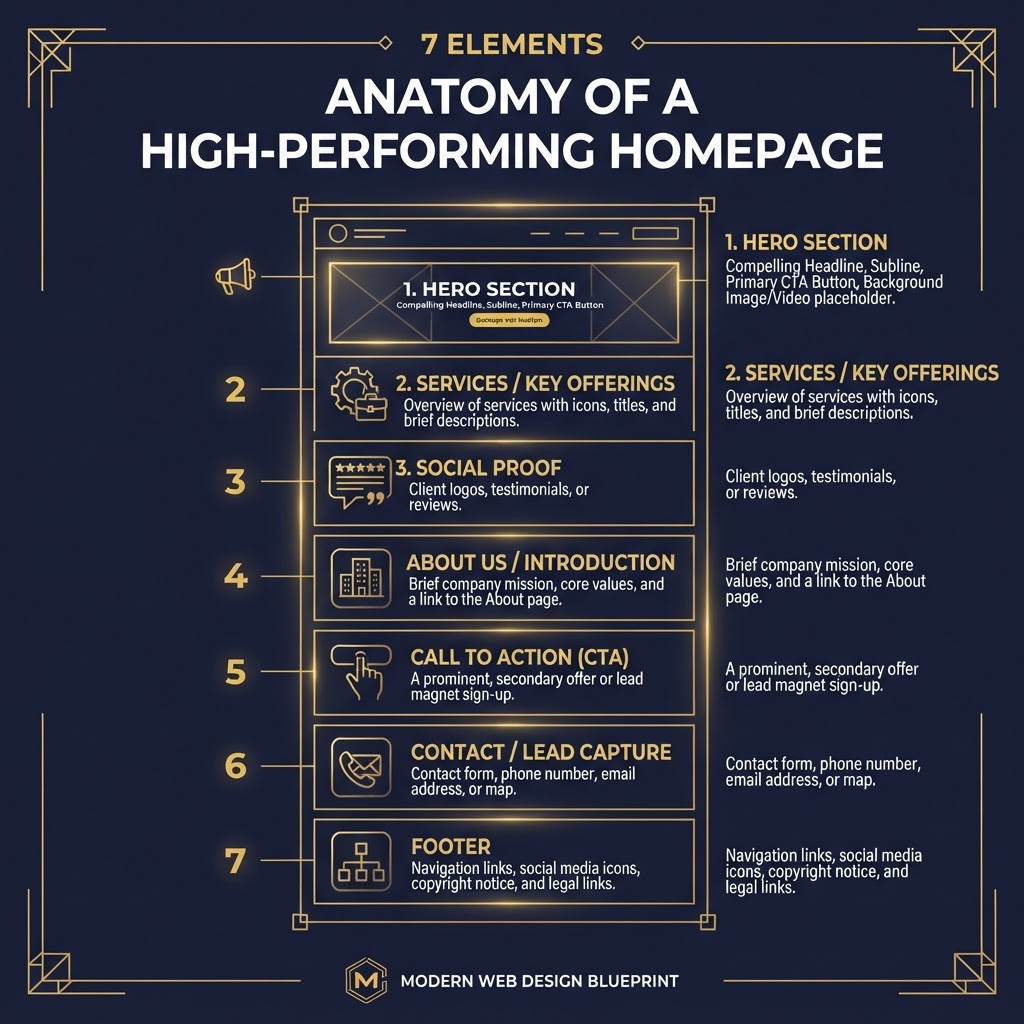
Your homepage is your digital storefront. But most service business homepages are designed to impress — not to convert. Here are the 7 elements that actually turn visitors into calls.
The Problem with Most Service Business Homepages
Walk through any high street and you'll see shop windows designed to pull people inside. Clear signage. An inviting display. A reason to walk through the door.
Now look at most service business websites. A rotating carousel that nobody reads. A vague tagline. A "Learn More" button that goes to a generic services page. No phone number above the fold. No clear reason to choose this business over the competitor three streets down.
The homepage is the single most visited page on your website. For most service businesses, it accounts for 60-80% of all traffic. Yet it's often the page that converts the worst.
The fix isn't a redesign. It's understanding what a homepage is actually supposed to do.
What a Homepage Is Really For
Your homepage has one job: move the visitor to the next step.
Not to tell your full company history. Not to list every service in exhaustive detail. Not to win design awards. Just to get the visitor to take one action — call, book, fill out a form, or visit a specific service page.
Every element on your homepage should serve that single purpose. If it doesn't, it's working against you.
Here are the 7 elements that make it happen.
1. A Clear, Specific Headline (Above the Fold)
Your headline is the first thing visitors read. It needs to answer one question in under three seconds: "Am I in the right place?"
Bad: "Welcome to Smith & Co. Plumbing" Good: "Emergency Plumbing in Nottingham — Fast Response, Fair Prices, No Mess"
The difference? The first tells the visitor who you are. The second tells them what you do, where you do it, and why they should care.
Your headline should include:
- What you do (the service)
- Who you do it for (the area or audience)
- A reason to choose you (speed, price, quality, trust)
Keep it under 12 words. Make it the largest text on the page. Don't bury it in a carousel.
2. A Compelling Subheadline and Visual
Right below your headline, you need one or two sentences that expand on the promise. This is where you add specificity.
Example: "Family-run plumbing service covering Nottingham and surrounding areas. 30+ years of experience, Gas Safe registered, same-day callouts for emergencies."
Pair this with a strong visual — a photo of your actual team, your van, or a completed job. Not a stock photo of a generic plumber. People can tell the difference, and stock photos erode trust.
3. A Primary Call-to-Action (Above the Fold)
If a visitor can't figure out how to contact you within 5 seconds, they'll leave. Your primary CTA — usually a phone number or "Book Now" button — must be visible without scrolling.
Best practice for service businesses:
- Show your phone number as a clickable link (many mobile users will tap to call)
- Use a high-contrast button colour (gold, orange, or green work well)
- Make the CTA text action-oriented: "Call Now," "Book a Visit," "Get a Quote" — not "Submit" or "Learn More"
One CTA above the fold. Not three. Not five. One. Decision paralysis kills conversions.
4. Service Summary with Quick Links
Your homepage isn't the place to explain every service in detail — that's what service pages are for. But visitors need to know at a glance what you offer.
Present your 3-5 core services as cards or a simple list, each linking to a dedicated page. Each card needs:
- A short title (e.g., "Boiler Installation")
- One sentence describing the service
- A "Learn More" link to the full service page
This serves two purposes: it helps visitors find what they need quickly, and it creates clear navigation paths that Google can follow to index your service pages.
5. Social Proof (Reviews, Badges, Case Studies)
Trust is the currency of local search. A visitor who's never heard of you needs evidence that you're worth calling.
What to include:
- 3-5 recent Google reviews with star ratings (use the actual text, not just stars)
- Trade body badges (Gas Safe, NICEIC, Checkatrade, etc.)
- A short case study or "recent work" section with before/after photos
- Logos of any well-known clients or partners
Don't hide these at the bottom of the page. Place them prominently — ideally between the service summary and the about section. Social proof is what tips a hesitant visitor into a caller.
6. A Brief, Human About Section
People buy from people. Especially in service businesses where someone is coming into your home or premises. Your about section should answer:
- Who you are (not just "established in 1987" — that's boring)
- Why you started the business
- What you care about (your values, not just your services)
- A real photo of you or your team
Keep it to 3-4 sentences. This isn't your life story — it's a quick human connection that makes the visitor feel they'd be comfortable picking up the phone.
7. A Clear Contact Section (and a Second CTA)
At the bottom of your homepage — but not so far down that people give up — you need a clear contact section:
- Phone number (clickable on mobile)
- Email address
- Physical address (important for local SEO and trust)
- A simple contact form (name, phone, message — nothing more)
- An embedded Google Map showing your location or service area
This is also where you place your second CTA. By now the visitor has seen your services, read your reviews, and learned a bit about you. If they've scrolled this far, they're interested. Make it easy to act.
How to Audit Your Homepage in 10 Minutes
Before you change anything, assess where you are:
- Open your homepage on your phone (not your laptop — most of your visitors are on mobile)
- Can you see your phone number without scrolling?
- Can you tell what the business does within 3 seconds?
- Is there a clear button to call or book?
- Are there real reviews visible?
- Is there a photo of an actual person or real work?
- Can you find the contact details without hunting?
If you answered "no" to any of these, that's your priority fix list.
The Bottom Line
A homepage that converts isn't about beautiful design. It's about clarity, trust, and making it effortless for a potential customer to take the next step.
The 7 elements above aren't optional. They're the minimum standard for a service business website in 2026. If your homepage is missing any of them, you're losing calls to competitors with worse services but better websites.
Start with the audit. Fix the biggest gap first. Then work through the rest. You'll see the difference in your call volume within weeks — not months.
WORK WITH US
Ready to grow your digital presence?
Let's talk about your website, SEO, or AI search strategy.
Get a free consultation →TOPICS